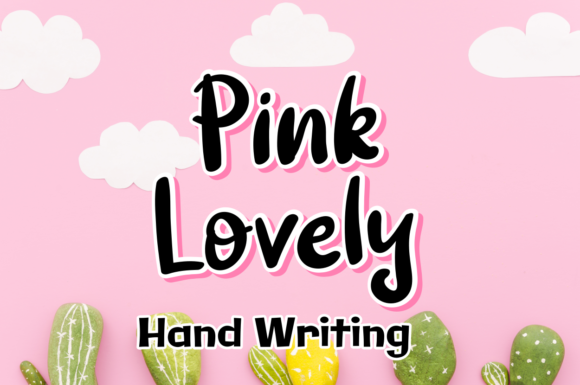
Pink Lovely Font Review
As a web designer, I’m always on the lookout for fonts that bring both personality and professionalism to a site. Pink Lovely has quickly become one of my go-to choices when I need a touch of soft elegance in a digital project. Its fresh and modern script style adds just the right amount of charm without overwhelming the design.
First Impressions: A Touch of Elegance
Testing Pink Lovely in a hero section of a boutique online store was the perfect starting point. The font’s flowing curves and gentle swashes give it a handcrafted feel, making it ideal for brands that want to convey warmth and creativity. It pairs beautifully with minimalist backgrounds, letting the typography shine while keeping the overall look clean and professional.
One of the first things I noticed was how well it translates across different screen sizes. On mobile devices, the font remains legible and doesn’t lose its character, which is crucial for responsive design. Whether it’s a large headline or a small CTA button, Pink Lovely maintains its visual appeal without becoming too busy or hard to read.
Web Usability: When to Use It
While Pink Lovely is undeniably beautiful, it’s important to consider where it works best. This font excels as a display font—perfect for headers, logos, and short phrases that need to stand out. I used it for a creative portfolio website, where it added a personal touch to the project titles and featured sections.
However, I wouldn’t recommend using it for long paragraphs of body text. The intricate details can make it difficult to read in dense blocks, especially on smaller screens. For body copy, pairing it with a simple sans serif like Lato or Open Sans creates a balanced and readable layout without sacrificing style.
Another consideration is accessibility. If your site needs to meet strict readability standards, Pink Lovely might not be the best choice for navigation menus or form labels. But for decorative accents and visual hierarchy, it’s a strong asset.
Designing for Brand Identity
When working on a digital brand kit for a wellness coaching business, I found that Pink Lovely helped reinforce the brand’s soft, approachable vibe. It worked well in social media graphics, email newsletters, and landing pages, adding a cohesive aesthetic that felt both modern and handmade.
The font also brought a sense of consistency across different touchpoints. From the main website header to the course sales page, Pink Lovely provided a visual thread that tied everything together. This kind of uniformity is essential for building trust and recognition among users.
For a product landing page, I paired Pink Lovely with a bold sans serif for the call-to-action buttons. The contrast between the two fonts created a dynamic yet balanced look, drawing attention to key actions without clashing with the overall design.
Responsive Layouts: Testing on Mobile
Mobile responsiveness is a top priority in web design, and Pink Lovely performed well in this area. I tested it on a range of devices, from smartphones to tablets, and found that it scaled smoothly without losing clarity. Even on smaller screens, the font remained easy to read and visually appealing.
On dark backgrounds, the font retained its softness and didn’t appear too harsh. On light backgrounds, it still stood out without being overly dominant. This versatility makes it a great choice for websites that use a variety of color schemes.
I also experimented with using it over image banners. The font’s subtle weight allowed it to sit nicely on top of visuals without competing with them. It worked particularly well for overlay text on hero images, where a delicate yet impactful typeface is needed.
Practical Tips for Web Designers
If you’re planning to use Pink Lovely in your projects, there are a few things to keep in mind. First, check the font’s file formats and ensure they’re compatible with your web hosting or design software. Many premium fonts come in WOFF or WOFF2 formats, which are optimized for fast loading and cross-browser support.
Also, consider the licensing terms if you’re using it for commercial purposes. Some fonts require a separate license for web use, so it’s important to verify that before integrating it into a client project or an online store.
Finally, take time to explore the font’s alternate characters and ligatures. These features can add a unique touch to your designs, allowing for more personalized and refined typography without having to manually adjust each letter.
Overall, Pink Lovely is a versatile and stylish font that brings a fresh, modern energy to any digital project. Whether you're designing a creative portfolio, a boutique store, or a brand identity, it offers a perfect balance of beauty and functionality.